 Adónde
Docs / In your assistant
How to use the Adónde connector
Plan a trip inside Claude, ChatGPT, Gemini, Grok or Perplexity. Not connected yet? Start with Connect your assistant.
Quick start
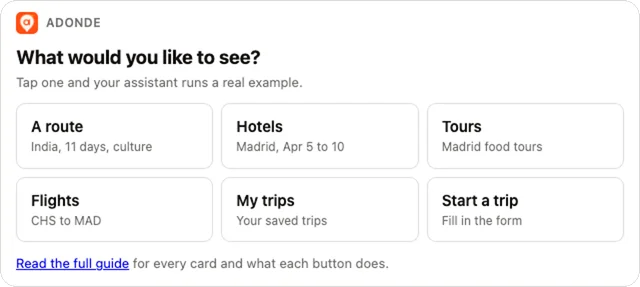
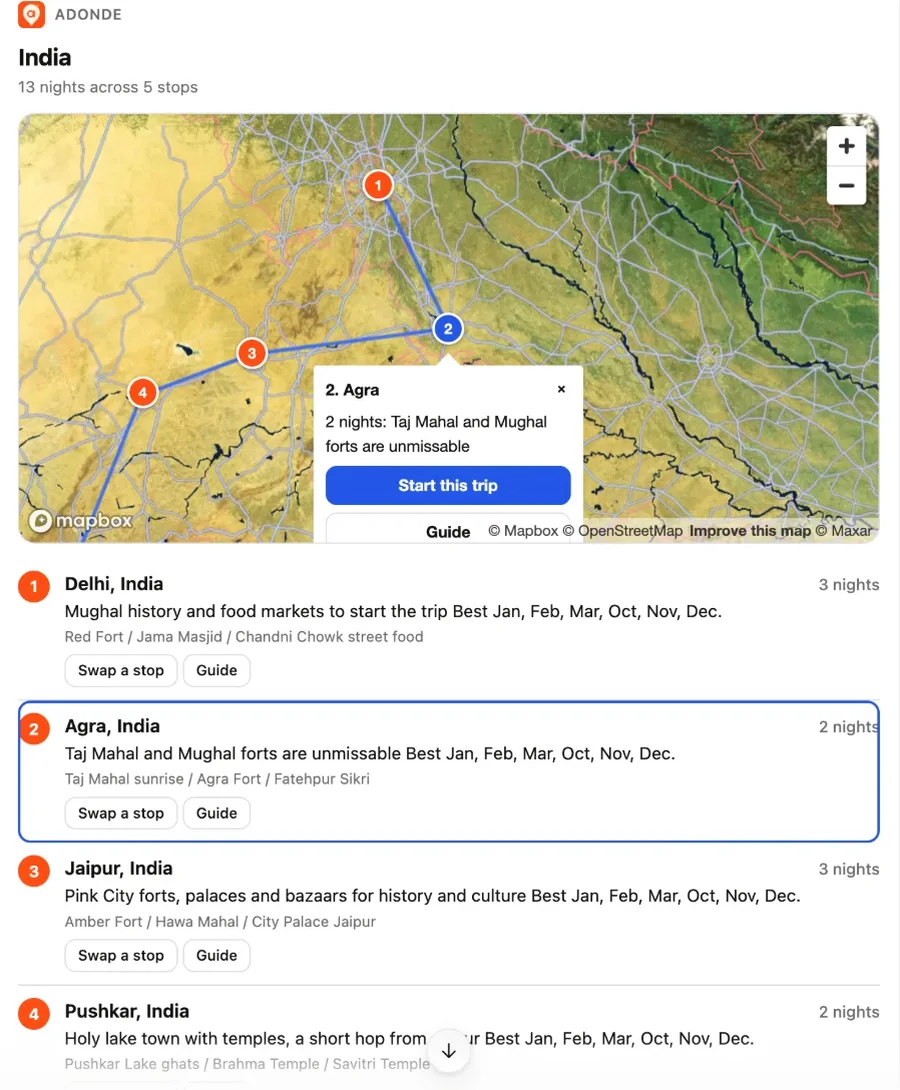
In any chat with Adónde connected, say adonde help or adonde demo. A card asks what you want to see: a route, hotels, tours, flights, your trips, or starting a trip. Tap one and the assistant runs a real example, then offers to run it with your own place and dates.
Three prompts to try:
- "Suggest a route for 11 days in India, 2 adults, culture" (a map card with numbered stops, nights and why)
- "Hotels in Madrid April 5 to 10 for 2 adults, cheapest first" (hotel cards with photos, prices and Book buttons)
- "Food tours in Madrid on April 7" (tour cards with prices and links into Adónde)
1. What to say to start
Name a place and say you want a trip. The assistant opens the trip form card, so you do not have to answer questions in chat.
- "Plan a trip to Portugal in May with my wife"
- "Three cities in India in February"
- "Find me a hotel in Ipanema under $200 for Dec 13 to 17"
- "What tours run in Kyoto on May 20?"
For a country or a feeling, the assistant proposes a route first.
2. The trip form card
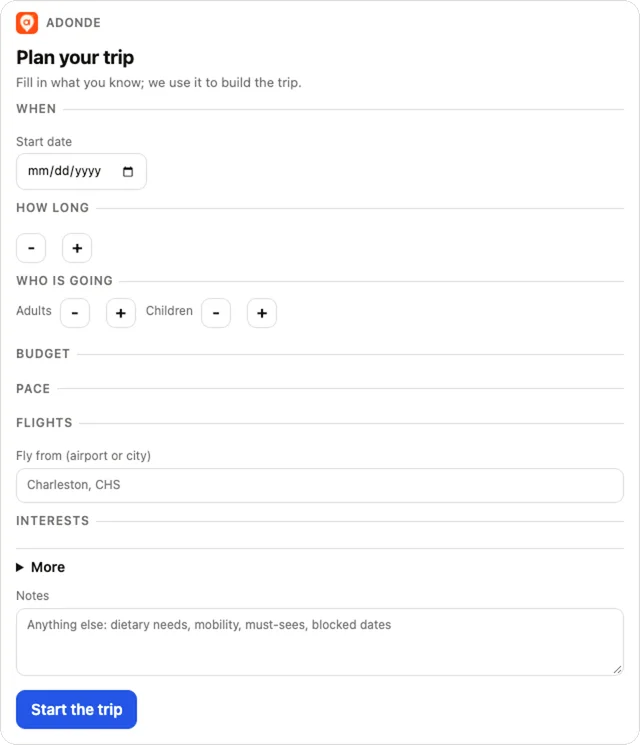
- What kind of trip? Pick one of four tiles: Abroad (one or more countries), Road trip (start, end, stops by drive time), Weekend (two or three nights, close to home) or In my country (domestic cities). The card moves on to the next step; Back or the step tabs at the top return to it.
- Where? Type in the search box and pick from the list; each result is tagged Country, Region or City, and each pick becomes a numbered chip. The box stays below the chips as Add another stop, so you can add as many countries and cities as you like. Drag a chip, or use its up and down arrows, to change the order; the cross removes it. A line under the chips counts them, for example "2 countries and 1 city". A Road trip asks for the start city and end city first (the end defaults to the start), then optional stops. A Weekend offers "Within 3 hours of" your home city when it is known. In my country only suggests places in your home country, taken from where you fly from or set on this step.
- When and who: dates or a target month, nights (1 to 60, a Weekend is up to 3) or an end date, adults and children (with ages), who is traveling, budget, pace, flights (find them from your airport, or book your own; hidden for a road trip), interest chips, and under "More": kind of trip, climate, crowds, getting around, between stops, deal-breakers, style. Notes is free text.
- The footer sums it up, for example "Abroad: Portugal, Spain, 10 nights from May 3, 2 adults". Press Start the trip: the card sends your details to the chat and the assistant creates the trip and asks Adónde to prepare its menu of tours, sights and food. Nothing is booked. A country, or two or more places, gets a route first; the assistant shows it on its own, you do not need to ask.
- If the card cannot reach the chat, it shows the line to paste instead. Without cards, the assistant asks at most two questions at a time.
The kind of trip shapes the rest. Abroad is the usual trip with flights, to one or more countries. Road trip drops flights, asks where you start and end, and plans stops no more than about 4 hours of driving apart. Weekend is 1 to 3 nights (2 to begin with), starts on the coming Friday, and gives a small, loose plan. In my country keeps flights but limits place suggestions to your home country.
3. The route card
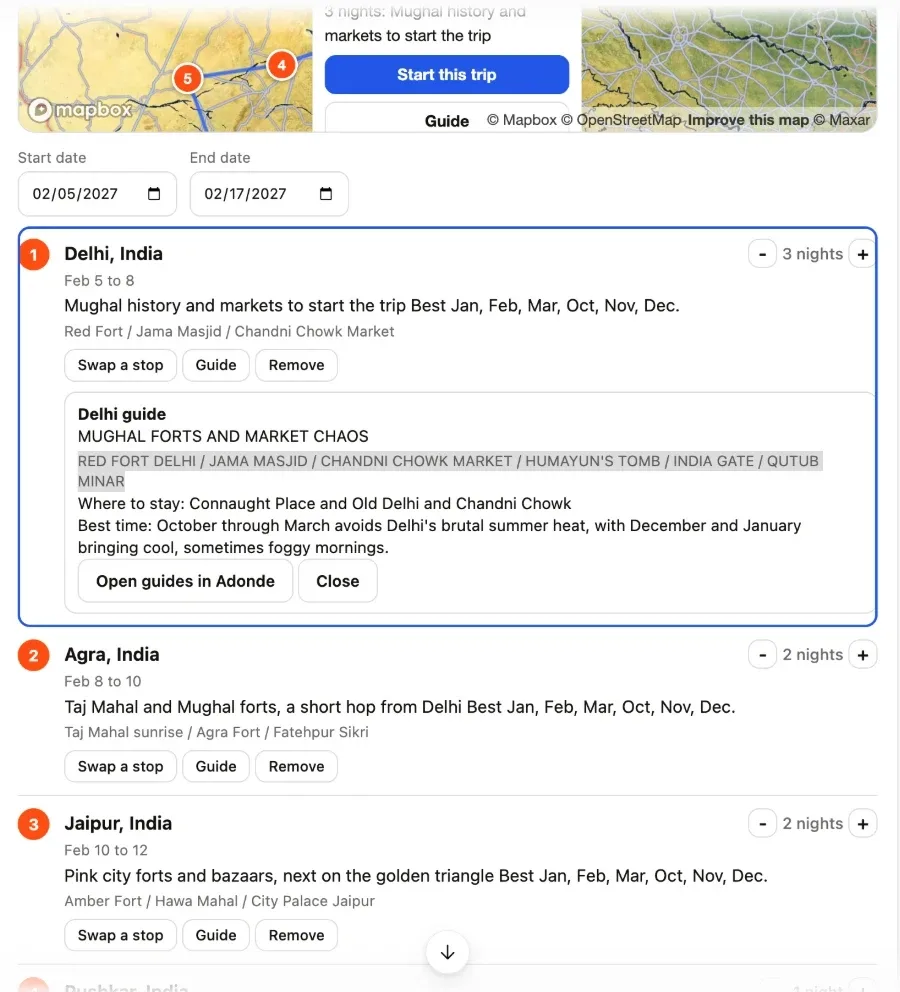
Shown for "where should I go". It has a map with numbered pins, then each stop with its nights and why.
- - / + change a stop's nights. Start and end dates are editable and the other end moves with you.
- Remove drops a stop (asks to confirm). Swap a stop offers other places.
- Guide opens a pop-out with that city's guide: highlights, where to stay, best time, questions. It has an add-to-chat button.
- Start this trip builds the trip from the route.
4. Picking from the menu
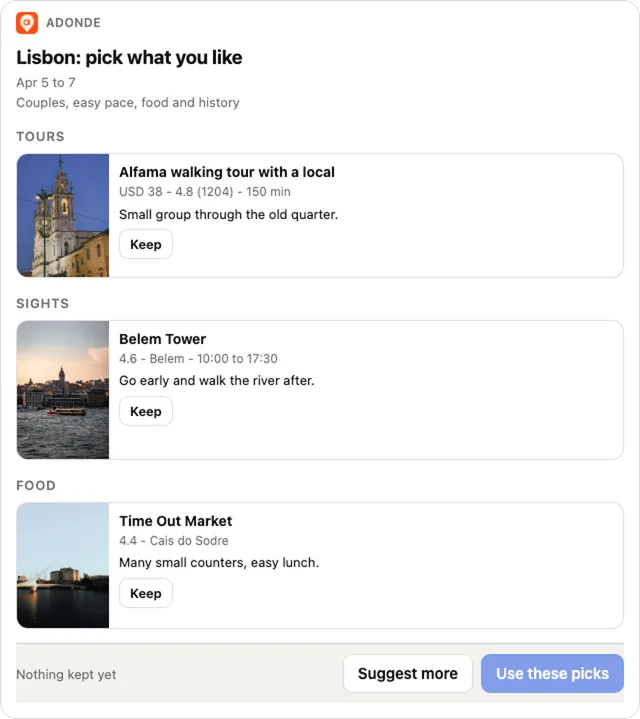
The menu card shows each stop's tours, sights and food as cards.
- Press Keep on what you like. Kept things are placed on your days for you.
- Rate any card Love, Like or Skip (tap again to clear). Love is always in the plan, Like is preferred, Skip is never used. Then press Build my days: one chat line goes to your assistant and the days are built around your ratings. Without cards, tell the assistant what you love, like or want to skip.
- The rules it follows: tours first (at most one paid tour a day), free sights stay first class, one lunch and one dinner at most, days stay sparse (about 3 to 5 things balanced, 2 to 4 loose, up to 6 packed), and arrival and departure days are light.
- A tour that does not run on any of your days is not offered or is refused: "runs on none of your days".
- Or say "you choose" and the assistant builds the rest itself.
5. Blocked time
Before the build, tell the assistant about time to keep clear (a wedding, a work call, a day to yourself). It is applied at the build and cannot be added after, so say it first.
6. The day-by-day card
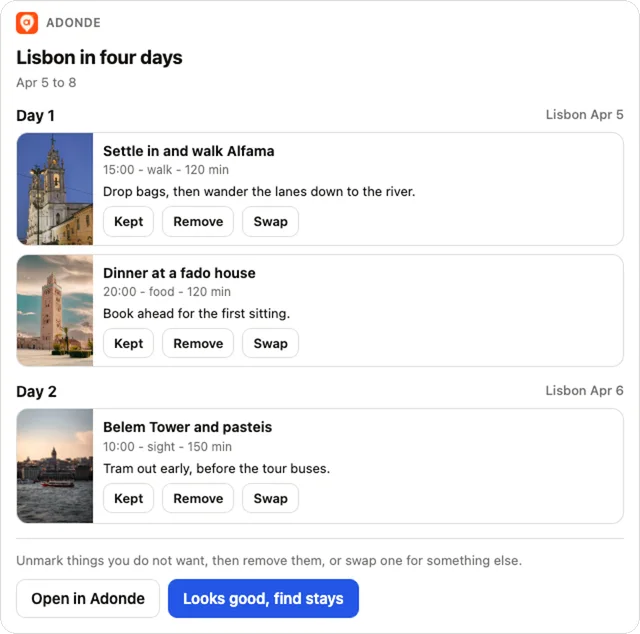
- Each day lists its stops with times, photos and links, plus a map.
- Remove takes an item off a day. Remove marked removes several. Swap asks the assistant to replace it with something else. Drag an item by its handle (works with a finger too) to another spot in the day or onto another day. The day is reflowed: tours keep their published start, everything else packs around them and around your blocked time, inside the day's hours. If something does not fit it turns red ("Overlaps Lunch at 14:00" or "Day is full") and is never moved silently. Save changes turns on when nothing is red and sends one chat line, which your assistant applies. Prefer no dragging? Each item has a Move menu (earlier, later, or another day). Discard changes puts everything back.
- A move or swap that does not fit is refused and the day stays as it was. Things listed as dropped did not fit the day's hours, a blocked window or the daily limit; add them elsewhere.
7. Hotels, flights and tours
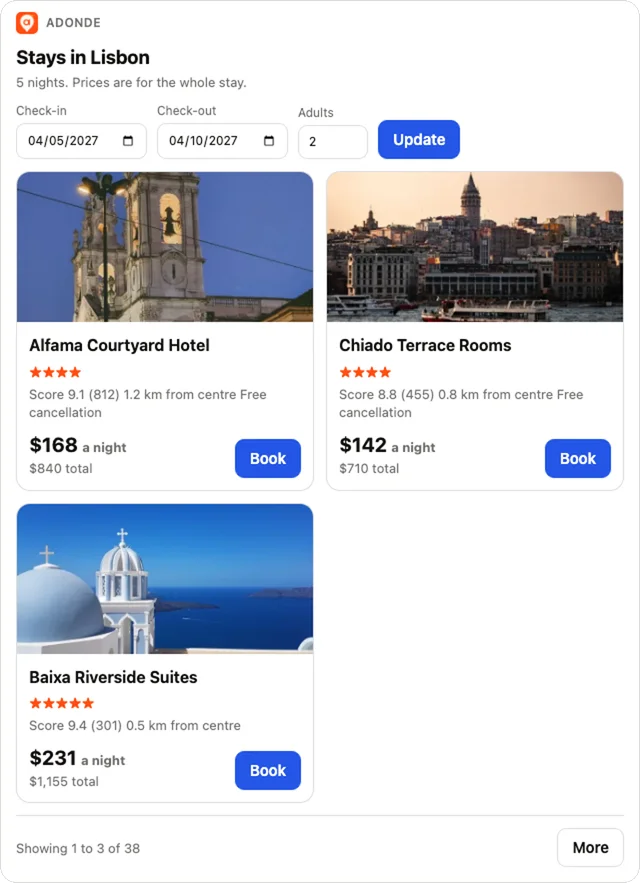
- Ask for stays by area, nightly budget, or in words ("quiet boutique near the old town"). The stays card shows photo, price per night and total, and a map. Ask for "more" for the next page. Tap a card to pop out the hotel in the chat: photos, amenities, the rooms and rates for your dates, and a Book this room button for each.
- Flights show the price basis (total for the party, round trip or one way), clock times and short connections. Tours show whether they run on your date and the departure times.
- Every link opens in Adónde (getadonde.com). The assistant never books or takes payment.
8. Keeping the trip
- Guest: ask to keep it, give your email, open the link we send. The trip moves into your account. Until then it is held for 7 days.
- Signed in: it is already in your Adónde account.
Sharing the trip
Once the days are shown, the assistant offers once to share the trip. Give it the emails (up to 10 at a time) and pick one:
- Build it together: each friend gets an email invitation. They open it, sign in or sign up, and join the trip. The trip must be in your account, so a guest keeps it first (section 8). Invitations work for 14 days.
- Show it off: a read-only link on getadonde.com that anyone can open without an account, good for 7 days. We email it to the addresses you give, and the assistant also hands you the link to copy. Ask the assistant to turn the link off whenever you like.
The day-by-day card has a Share this trip section with the same two choices. Up to 20 invitations per trip per day.
9. Opening it in the app
The assistant gives both store links after your searches: the App Store for iPhone and Google Play for Android. Your first trip includes the live interpreter, 150 offline phrases, offline maps, international location sharing, calendar and Excel export, flight monitoring and price watching.
10. What it will not do
- Book or pay for anything.
- Invent places: only what is on the menu or in the results.
- Build a second trip as a guest until the first is kept. Searches and edits stay open.
- Show other sites' links.
11. If a card does not appear
- Start a new chat and name a place.
- Say "use Adónde".
- Some assistants show text only; the same steps work in chat.
12. Troubleshooting
- "The menu is still being prepared": wait about 10 seconds and ask again.
- "Runs on none of your days": pick another tour or another day.
- "The stays (or flight) provider did not answer": try again in a moment; it does not mean there are none.
- Remove or move says no item found: ask the assistant to refresh the trip, ids change after edits.
Not connected yet? See Connect your assistant. What we collect is in the privacy policy. Trouble? Visit support.